


YouTube Musicを転送する方法 Spotify:完全ガイド
If you’ve been using YouTube Music but are considering moving to Spotify, one important concern is how to move your playlists without losing your music collection. Manually recreating playlists can take a long time, especially if you’ve spent years building them. Fortunately, several tools and methods make it possible to YouTube Musicを転送する Spotify efficiently. In this guide, we’ll explore practical ways to migrate your music library using desktop software and online tools.
コンテンツガイド Part 1. Overview: YouTube Music vs. SpotifyPart 2. Convert YouTube Music to Spotify on Winダウズ/マックPart 3. Transfer YouTube Music Playlist to Spotify 中国語を学ぶパート4。よくある質問パート5:結論
Part 1. Overview: YouTube Music vs. Spotify
Before learning how to transfer YouTube Music to Spotify, it’s helpful to understand the differences between the two streaming platforms. While both services provide access to vast music libraries, they focus on slightly different user experiences.
オーディオ音質
One key difference is audio quality. Spotify offers high-quality streaming options and continues to develop advanced audio features for premium users. YouTube Music also provides good streaming quality, but its strength lies more in the diversity of content rather than purely audio-focused features. Because the platform is integrated with YouTube, users can easily access live performances, remixes, covers, and unofficial uploads that might not appear in traditional music catalogs.
価格とサブスクリプションプラン
Both platforms provide free and premium tiers. Spotify’s free plan includes ads and some playback restrictions, while YouTube Music’s free version also includes ads and limits background playback on mobile devices. Premium subscriptions remove these restrictions and provide additional features such as offline downloads and ad-free listening.
- Read our in-depth comparison to see the difference between Spotify 無料対プレミアム.
音楽の発見と推奨
Spotify is widely known for its algorithm-driven playlists such as Discover Weekly and Daily Mixes, which help users find new songs based on listening habits. YouTube Music, on the other hand, benefits from YouTube’s recommendation system and large video library, offering a mix of official songs and video-based content.
Device Compatibility and Ecosystem Integration
Spotify integrates with a wide range of devices, including smart speakers, gaming consoles, and car systems. YouTube Music integrates closely with グーグル services and Android devices. Because of these differences, some listeners decide to transfer YouTube Music to Spotify in order to take advantage of Spotify’s ecosystem and playlist discovery tools.
Part 2. Convert YouTube Music to Spotify on Winダウズ/マック
One of the most reliable methods to transfer YouTube Music to Spotify is using desktop software that allows you to download YouTube Music tracks and upload them to Spotify. A powerful solution for this process is DumpMedia あらゆる音楽コンバータ, which works on both Windows と macOS。
This tool allows users to download songs or playlists from YouTube Music and convert them into common audio formats compatible with Spotify. After downloading the files, they can be added to Spotify’s local library.
More Amazing Features of DumpMedia
- ⭐Integration with YouTube Music Web Player
- ⭐Work for Both YouTube Music Premium and Free Users
- ⭐音楽を変換する MP3/AAC/WAV/FLAC/ALAC/AIFF
- ⭐最大35倍の高速変換速度を実現
- ⭐出力設定をカスタマイズできます
- ⭐すべてのメタデータ情報を保持
- ⭐100% クリーン。使用してもリスクはありません
YouTubeミュージックを Spotify DumpMedia
ステップ 1: ダウンロードしてインストール DumpMedia Any Music Converter on your Mac/Winダウズ。
ステップ 2: Launch it, and you will see the interface. Use your YouTube Music Premium/Free account to log in. Browse the YouTube Music library to access any song to download for streaming offline. Only by dragging and dropping them to the conversion list (the plus button), all the songs contained will be added to get ready to process the conversion.
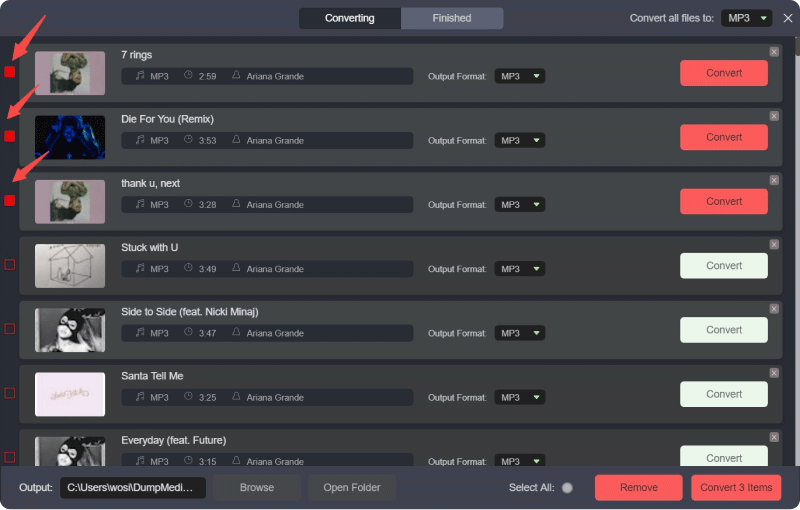
ステップ 3: 変換インターフェースでは、出力形式を次のように選択できます。 MP3をクリックし、環境設定でサンプルレートまたはビットレートを設定します。また、音楽ファイルを保存するフォルダーを選択します。
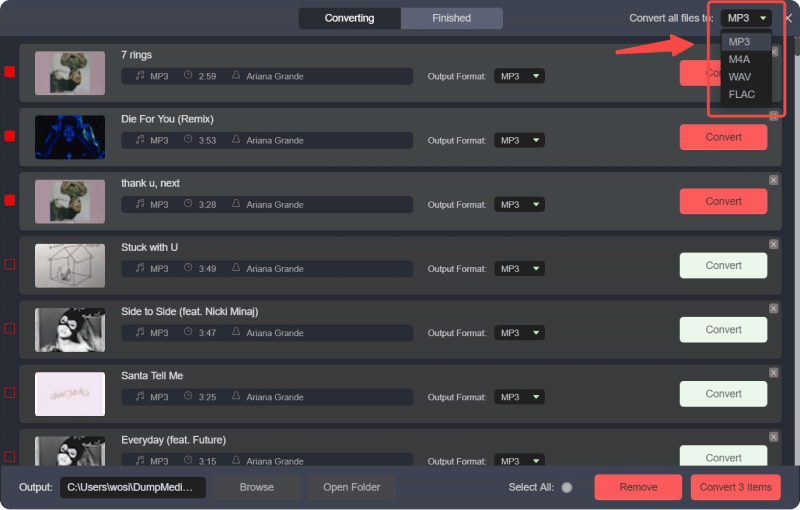
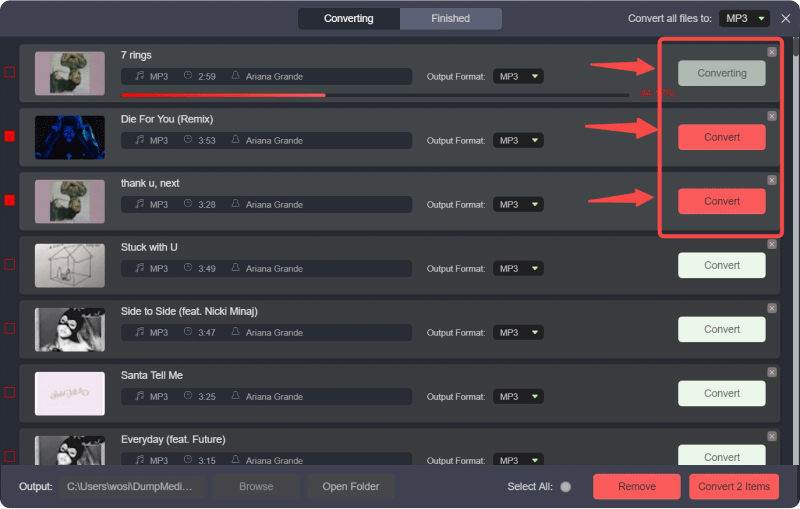
ステップ 4: In the final step, click on the "Convert All" button to start converting all YouTube Music songs to MP3 オンライン。
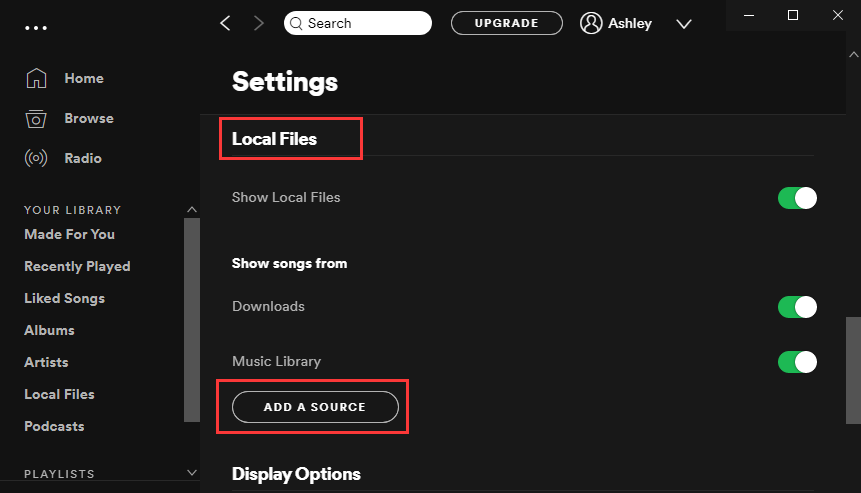
ステップ 5: 店は開いています Spotify on your computer and go to the Settings menu. Enable the Local Files option so Spotify can detect music stored on your device. Then choose the folder where DumpMedia saved the downloaded tracks.
ステップ 6: Spotify will scan the folder and add those songs to your local library. Once the tracks appear, you can create a new playlist and include them just like any other Spotify 曲。
This method allows you to successfully transfer YouTube Music to Spotify while keeping control over your music files.
Additional Tip: Playlist Transfer Feature
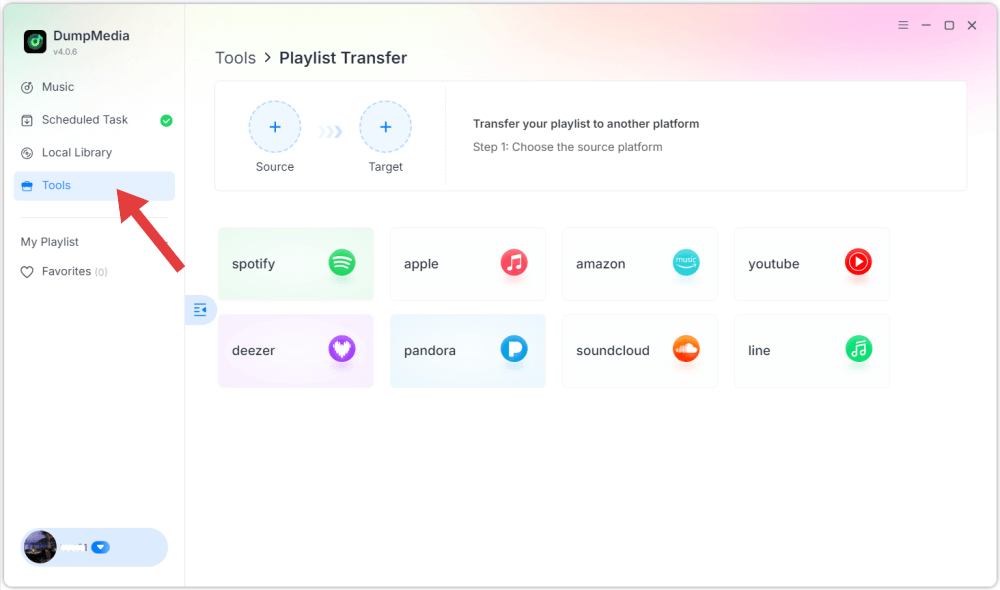
DumpMedia Any Music Converter also includes a Playlist Transfer feature designed to simplify the migration process. Instead of downloading and adding each song individually, this feature can help recreate playlists automatically between platforms.
By connecting your accounts and selecting the playlist you want to migrate, DumpMedia can rebuild the playlist structure on Spotify. For users with large music libraries, this is one of the most efficient ways to transfer YouTube Music to Spotify without spending hours organizing songs manually.
Part 3. Transfer YouTube Music Playlist to Spotify 中国語を学ぶ
If you prefer not to install software on your computer, another way to transfer YouTube Music to Spotify is by using an online playlist migration tool. One popular service is TuneMyMusic, which allows users to move playlists between different streaming platforms through a web browser.
ステップバイステップガイド
ステップ 1: To start, open the TuneMyMusic website and click the option to begin a new transfer. Select YouTube Music as the source platform and log in to your account so the tool can access your playlists.
ステップ 2: Once your playlists are loaded, choose the playlist you want to move. The service will analyze the track list and prepare the songs for matching with Spotifyのカタログ。
ステップ 3: 次に、 Spotify as the destination platform and authorize the connection.
ステップ 4: After confirming the transfer, TuneMyMusic will automatically search for corresponding tracks on Spotify and recreate the playlist.
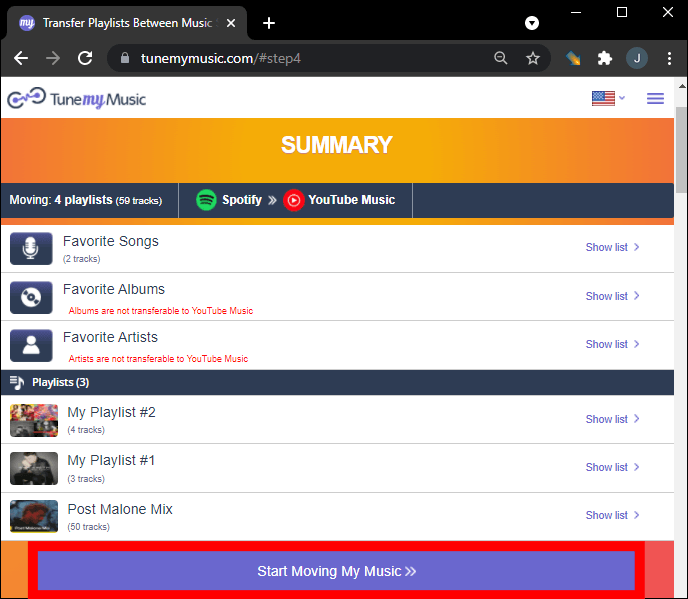
ステップ 5: When the process is complete, you can open Spotify and see the newly created playlist in your library.
Online tools like TuneMyMusic provide a convenient solution for users who want to transfer YouTube Music to Spotify quickly without installing desktop software. However, free versions may have limitations on playlist size or the number of transfers.
パート4。よくある質問
YouTube Musicを転送できますか? Spotify 直接?
No. Streaming services usually do not allow direct playlist transfers between platforms. You need third-party tools such as DumpMedia or TuneMyMusic to complete the process.
すべての曲が正常に転送されますか?
Most songs will transfer correctly because both platforms have large music catalogs. However, occasionally some tracks may not be available on Spotify, which means they cannot be matched during the transfer.
Is it possible to transfer entire playlists?
Yes. Many tools support full playlist migration. DumpMedia’s Playlist Transfer feature and online services like TuneMyMusic can both recreate playlists on Spotify.
プレイリスト転送ツールを使用するのは安全ですか?
Reputable tools use secure authentication systems to connect to your streaming accounts. Always choose trusted services when attempting to transfer YouTube Music to Spotify.
パート5:結論
Switching music streaming platforms doesn’t mean you have to lose your favorite playlists. With the right tools, it is entirely possible to transfer YouTube Music to Spotify without rebuilding your music library manually.
のようなデスクトップソフトウェア DumpMedia Any Music Converter provides a powerful solution by allowing users to download songs from YouTube Music and upload them to Spotify as local files. Its Playlist Transfer feature can further simplify the process for large music collections. Meanwhile, online services such as TuneMyMusic offer a convenient browser-based alternative for quickly migrating playlists.

めにサインアップ