


転送方法 Spotify Amazon Musicのプレイリスト?
Music streaming services have transformed how people listen to music. However, switching platforms can sometimes be inconvenient, especially when you have carefully curated playlists built over time. Many users who previously relied on Spotify may decide to try アマゾン・ミュージック for its integration with Amazon devices, extensive music library, and compatibility with Alexa-enabled smart speakers.
Fortunately, several tools now make it possible to move playlists between streaming services automatically. In this guide, we’ll explain the most effective methods to 転送 Spotify プレイリストをAmazon Musicに using online tools, desktop software, and mobile apps. Whether you are using Windows, Mac, iOS, or Android, you’ll find a solution that helps you migrate your playlists quickly and accurately.
コンテンツガイド パート 1. 転送 Spotify Playlists to Amazon Music Onlineパート 2. 転送 Spotify Playlists to Amazon Music on Winダウズ/マックパート 3. 転送 Spotify Playlists to Amazon Music on iOSパート 4. 転送 Spotify Playlists to Amazon Music on Androidパート5。よくある質問パート6:結論
パート 1. 転送 Spotify Playlists to Amazon Music Online
For users who want a quick and simple method without installing software, online playlist transfer tools are a convenient option. These services allow you to connect your streaming accounts through a web browser and automatically migrate playlists between platforms.
One of the most popular online tools for this purpose is TuneMyMusic. TuneMyMusic is a web-based playlist migration tool that supports many streaming platforms. It allows users to transfer Spotify playlist to Amazon Music with only a few steps.
他社とのちがい
- Works directly in your web browser
- Supports many streaming platforms
- Simple interface with step-by-step guidance
- いいえソフトウェアのインストールは必要ありません
転送する手順 Spotify Playlist to Amazon Music with TuneMyMusic
ステップ 1: Visit the TuneMyMusic website and click the “Let’s Start” button to begin the process.
ステップ 2: 選択する Spotify as the source platform and sign in to your account. The tool will request permission to access your playlists.
ステップ 3: Once connected, you can select the specific playlist you want to migrate or paste the playlist link. The system will load all songs in that playlist.
ステップ 4: Next, choose Amazon Music as the destination service and log in to your Amazon account to authorize the transfer.
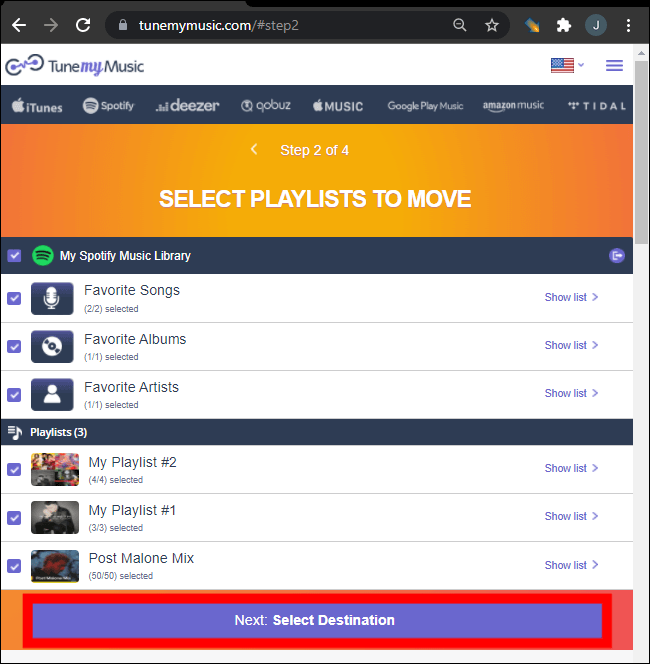
ステップ 5: Click “Start Moving My Music.” The tool will automatically match songs from Spotify with the Amazon Music catalog.
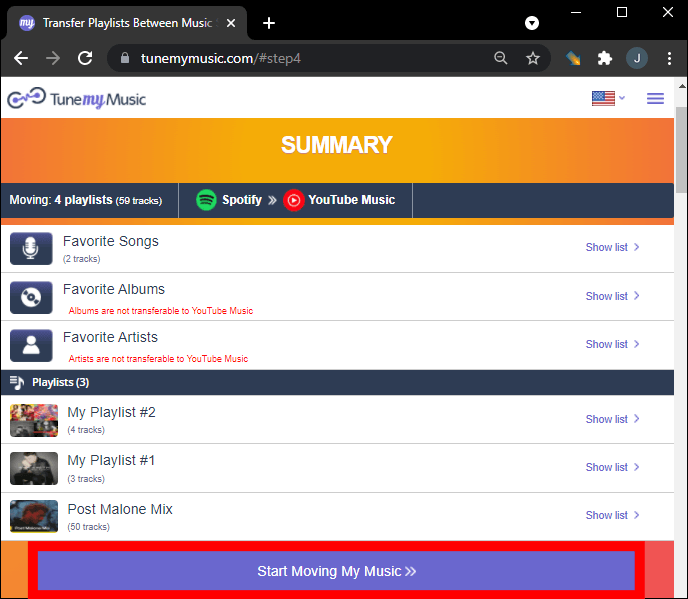
ステップ 6: After the process is complete, open your Amazon Music library to confirm that the playlist has been created successfully.
Using an online tool like TuneMyMusic is one of the fastest ways to transfer Spotify playlist to Amazon Music for small or medium-sized playlists. However, for users with large music libraries or those who want more stability, a desktop solution may be a better choice.
パート 2. 転送 Spotify Playlists to Amazon Music on Winダウズ/マック
If you want a more reliable and feature-rich solution, using desktop software is often the best option. DumpMedia あらゆる音楽コンバータ is a powerful program designed to manage and convert music while also offering a dedicated Playlist Transfer feature. DumpMedia allows users to transfer Spotify playlist to Amazon Music efficiently while preserving playlist information and song metadata.
他社とのちがい
- お客様サポート WindowsとmacOS
- Dedicated Playlist Transfer feature
- Batch playlist migration
- Smart track matching
- Maintains metadata such as artist, album, and track titles
- Stable local processing without browser limitations
These features make it one of the most efficient ways to transfer Spotify playlist to Amazon Music for users with large playlists.
ステップバイステップガイド
ステップ 1: ダウンロードしてインストール DumpMedia あなたの音楽コンバーター WinWindowsまたはMacコンピュータ。インストール後、プログラムを起動してください。
ステップ 2: Choose Tools > Playlist Transfer. Select Spotify 情報源として。
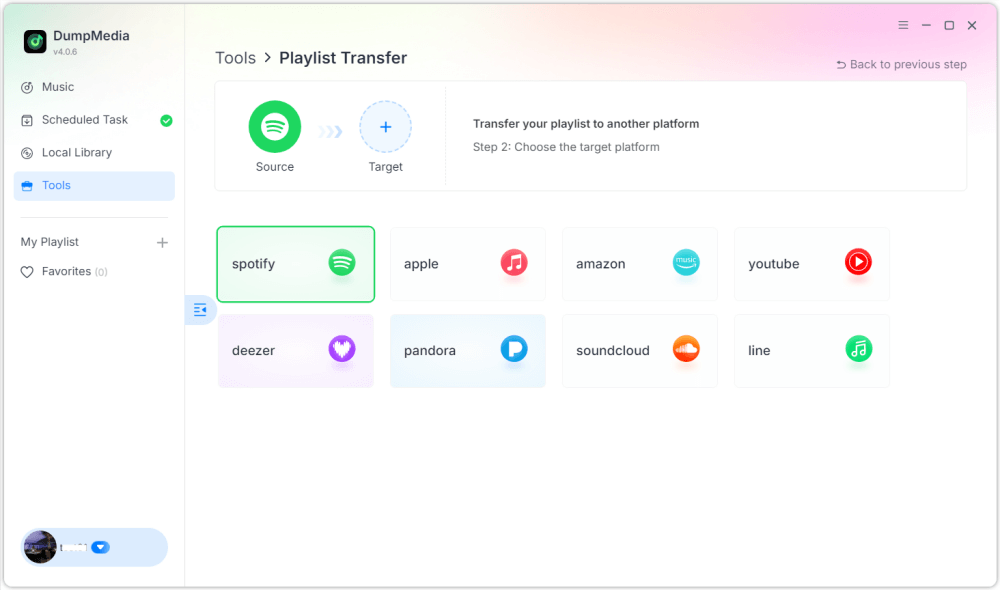
ステップ 3: Select Amazon Music as a destination.
ステップ 4: 転送するものを選択してください。お気に入りの曲、アーティスト、アルバム、厳選したプレイリストをサポートしています。
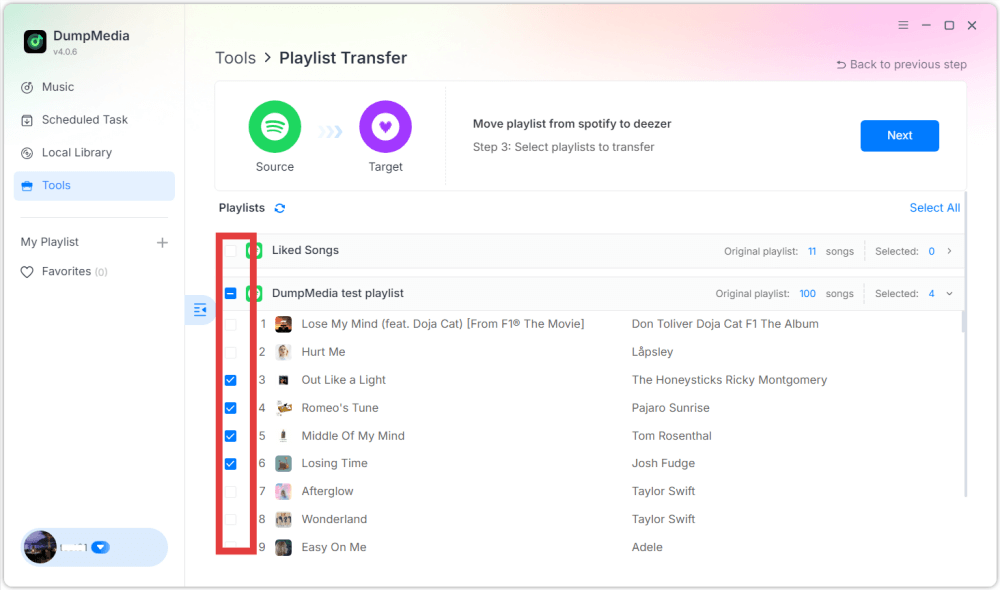
ステップ 5: 転送を開始するには、「変換」をクリックします。
ステップ 6: The transfer is finished. Click "Go to Amazon Music". Your playlists have been moved to a new service, and you can start enjoying a new playlist on Amazon Music.
Compared to online services, this method provides more stability and better accuracy when you transfer Spotify playlist to Amazon Music.
パート 3. 転送 Spotify Playlists to Amazon Music on iOS
If you prefer using a mobile device, several apps can help you transfer Spotify playlist to Amazon Music directly from your iPhone or iPad. One of the most popular options is SongShift. SongShift is a well-known playlist migration app designed for iOS users. It supports many music streaming services and offers an intuitive interface for transferring playlists.
他社とのちがい
- 使いやすいモバイルインターフェース
- 複数のストリーミングプラットフォームをサポート
- Allows batch playlist transfers
- Built specifically for iOS devices
転送する手順 Spotify Playlist to Amazon Music with SongShift
ステップ 1: Download SongShift from the App Store and open the app. Authorize Spotify so the app can access your playlists.
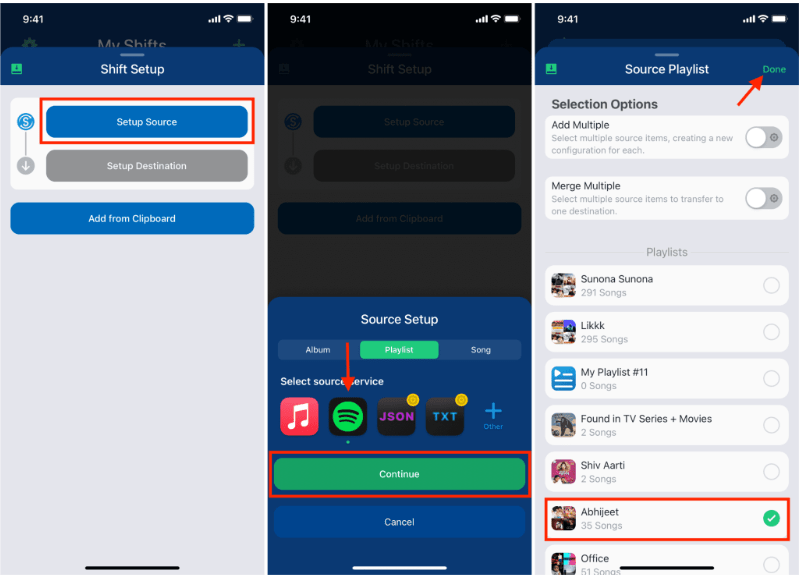
ステップ 2: Add Amazon Music as your destination service by logging into your Amazon account.
ステップ 3: 選択する Spotify playlist you want to migrate.
ステップ 4: Tap Start Shift and let the app match songs across platforms.
After the process is complete, your playlist should appear in Amazon Music. SongShift is a convenient option for users who want to transfer Spotify playlist to Amazon Music without using a computer.
パート 4. 転送 Spotify Playlists to Amazon Music on Android
Android users can also transfer playlists between streaming services using dedicated apps. One widely used solution is FreeYourMusic. FreeYourMusic is a cross-platform music transfer tool that works on Android, iOS, Windows, and macOS. It allows users to move playlists between streaming services with minimal effort.
他社とのちがい
- Supports many streaming platforms
- Simple transfer process
- 複数のデバイスで動作
- Allows batch playlist transfers
転送する手順 Spotify Playlist to Amazon Music with FreeYourMusic
ステップ 1: Download FreeYourMusic from the Google Play Store and open the application. Select Spotify as the source platform and log in to your account.
ステップ 2: Choose Amazon Music and sign in to your account.
ステップ 3: 選ぶ Spotify playlist you want to migrate.
ステップ 4: Tap Transfer to begin the migration. The app will match songs and recreate the playlist in Amazon Music.
パート5。よくある質問
1. 転送できますか Spotify playlist to Amazon Music for free?
Some tools provide free playlist transfers with limitations, such as a maximum number of songs per transfer. Premium versions usually remove these restrictions.
2. Will every song transfer successfully?
Most songs will transfer successfully, but occasionally some tracks may not be available on both platforms due to licensing differences.
3. How long does it take to transfer playlists?
The time required depends on the size of your playlist. Smaller playlists may transfer within minutes, while larger ones may take longer.
4. Is it safe to use playlist transfer tools?
Reputable tools use secure authentication to access your accounts. Always choose trusted applications when you transfer Spotify playlist to Amazon Music.
パート6:結論
Whether you prefer an online service, a desktop program, or a mobile app, there are several ways to transfer Spotify playlist to Amazon Music quickly and efficiently. For users who want the most stable and accurate results, especially for large playlists, DumpMedia Any Music Converter offers one of the best solutions.

めにサインアップ