


Amazon Musicを転送する方法 Spotify [3つの回答]
Streaming platforms offer vast music libraries, but users often switch services to seek better features. If you are moving from アマゾン・ミュージック 〜へ Spotify, the biggest hurdle is transferring your carefully curated playlists without the tedious task of manual rebuilding. This guide compares both platforms and explores the most efficient ways to help you Amazon Musicを転送する Spotify without rebuilding playlists from scratch.
コンテンツガイド Part 1. Overview: Amazon Music vs. SpotifyPart 2. Transfer Amazon Music Playlist to Spotify on Winダウズ/マックPart 3. Transfer Amazon Music Playlist to Spotify 中国語を学ぶPart 4. Transfer Amazon Music Playlist to Spotify iOS / Androidパート5。よくある質問パート6:結論
Part 1. Overview: Amazon Music vs. Spotify
AmazonMusicと Spotify offer extensive music libraries and convenient streaming experiences, but they differ in several important ways that influence user preferences.
価格とサブスクリプションプラン
Amazon Music offers several subscription tiers, including a free version, Amazon Music Prime for Amazon Prime members, and Amazon Music Unlimited. Spotify also offers both free and premium plans. Spotify’s free tier includes advertisements and limited playback features, while Spotify Premium provides ad-free listening, offline downloads, and unlimited skips.
- 詳細な比較を読んで違いを確認してください Spotify 無料対プレミアム.
オーディオ音質
Amazon Music is known for offering high-resolution audio options through Amazon Music Unlimited, which includes HD and Ultra HD tracks. Spotify also provides high-quality streaming and is widely recognized for its consistent playback performance across devices. For many listeners, both platforms deliver excellent sound quality, although Amazon Music focuses more heavily on high-resolution audio options.
Features and Music Discovery Tools
Spotify is widely praised for its advanced recommendation system and algorithm-driven playlists such as Discover Weekly and Daily Mix. These personalized playlists help users discover new music based on listening habits. Amazon Music provides curated playlists and voice integration with Amazon Alexa, making it especially convenient for smart home environments.
デバイスの互換性とエコシステムの統合
Amazon Music integrates deeply with Amazon devices such as Echo speakers, while Spotify works seamlessly with a wide range of third-party devices, including smart TVs, gaming consoles, and car systems. Because of these differences, many listeners decide to transfer Amazon Music to Spotify を活用します Spotify’s discovery features and broader device compatibility.
Part 2. Transfer Amazon Music Playlist to Spotify on Winダウズ/マック
One of the most reliable ways to transfer Amazon Music to Spotify is by using desktop software that includes playlist migration features. A recommended solution is DumpMedia あらゆる音楽コンバータ両方に作用する Windows and macOS. This software includes a Playlist Transfer feature designed to help users migrate playlists between streaming platforms quickly and efficiently.
DumpMedia Any Music Converter allows users to connect their music accounts and automatically recreate playlists on the destination platform. Instead of manually searching for each track, the program scans your playlist, matches songs between services, and builds the playlist again on Spotify. This approach saves a significant amount of time, especially for users who maintain large music libraries.
ステップバイステップガイド
ステップ 1: ダウンロードしてインストール DumpMedia あなたの音楽コンバーター WinWindowsまたはMacコンピュータ。インストール後、プログラムを起動してください。
ステップ 2: Once your library loads, navigate to the Playlist Transfer section of the program.
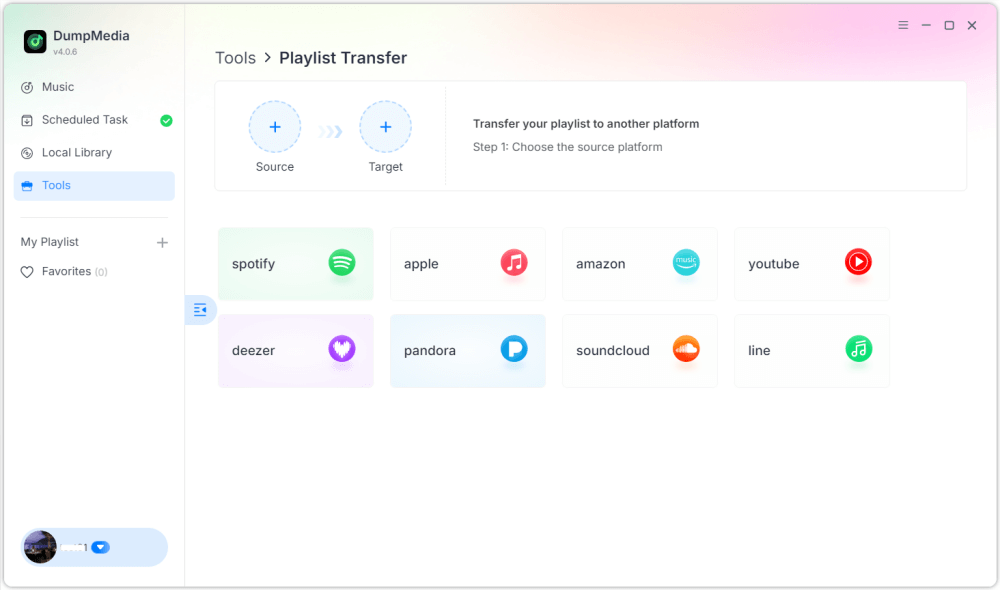
ステップ 3: Choose Amazon Music as a source.
ステップ 4: 選択する Spotify 目的地として。
ステップ 5: 転送するものを選択してください。お気に入りの曲、アーティスト、アルバム、厳選したプレイリストをサポートしています。
ステップ 6: 転送を開始するには、「変換」をクリックします。
ステップ 7: 転送が完了しました。「移動」をクリックしてください Spotify". Your playlist should now appear with matched songs.
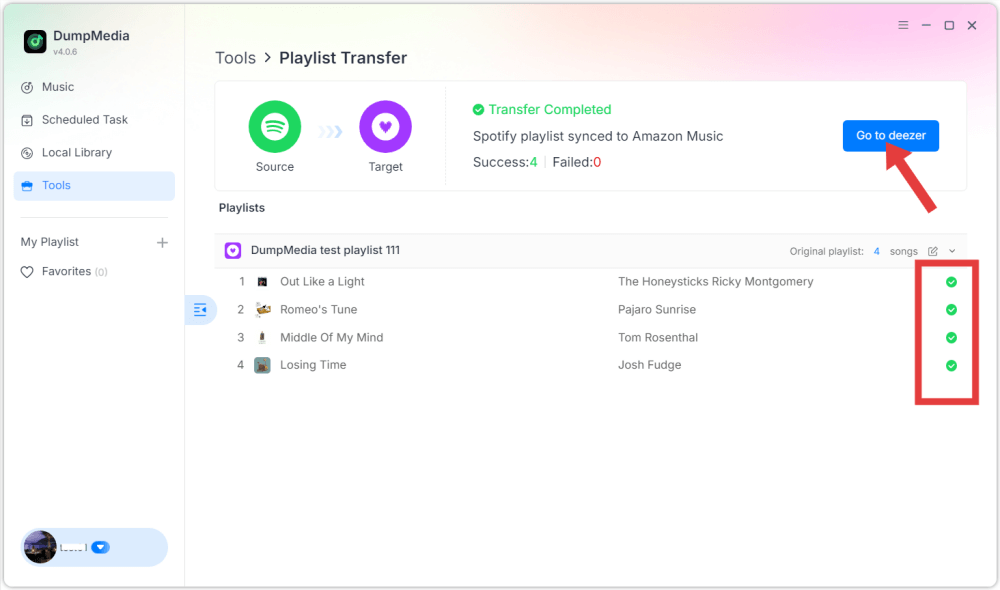
Using this method, users can efficiently transfer Amazon Music to Spotify while preserving playlist order and track information.
Part 3. Transfer Amazon Music Playlist to Spotify 中国語を学ぶ
Another convenient way to transfer Amazon Music to Spotify is by using an online playlist migration service. One widely used tool is TuneMyMusic, which works directly in a web browser and requires no installation. Online tools are especially useful for users who want a quick solution without installing additional software.
ステップバイステップガイド
ステップ 1: To begin, visit the TuneMyMusic website and start a new transfer process. Choose Amazon Music as the source platform and sign in to your account so the service can access your playlists.
ステップ 2: After connecting your account, the platform will display your available playlists. Select the playlist you want to migrate and proceed to the next step.
ステップ 3: 次に、 Spotify as the destination platform and log in to authorize the connection. TuneMyMusic will then analyze your playlist and attempt to match each track with Spotifyのカタログ。
ステップ 4: Once the process finishes, the playlist will be recreated automatically in your Spotify library. This makes it easy to transfer Amazon Music to Spotify without needing technical skills.
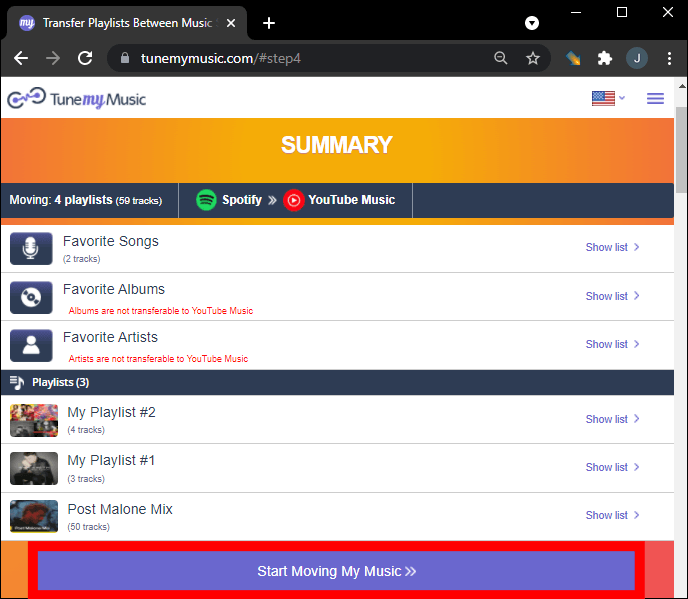
Although online tools are convenient, they sometimes have limitations such as transfer limits or slower performance for large playlists. For users with extensive libraries, desktop tools may provide a more stable solution.
Part 4. Transfer Amazon Music Playlist to Spotify iOS / Android
If you prefer using your smartphone to manage music libraries, several mobile apps can also help you transfer Amazon Music to Spotify. These apps allow users to migrate playlists directly from their mobile devices. One popular mobile solution is FreeYourMusic, which works on both iOS and Android devices. The app supports multiple streaming platforms and provides a simple interface for transferring playlists.
ステップバイステップガイド
ステップ 1: After installing the app, open it and select Amazon Music as the source platform. Sign in to your account so the app can access your playlists.
ステップ 2: それから、 Spotify を宛先プラットフォームとして選択し、接続を承認します。
ステップ 3: Next, select the playlist you want to move and start the transfer. The application will automatically search for matching tracks in Spotify’s catalog and recreate the playlist.
Mobile apps like FreeYourMusic provide a convenient way to transfer Amazon Music to Spotify directly from a smartphone, especially for users who prefer not to use a computer.
パート5。よくある質問
Will every song transfer successfully?
In most cases, the majority of tracks will transfer correctly. However, some songs may not appear if they are unavailable on the destination platform.
転送プロセスにはどのくらい時間がかかりますか?
The time required depends on the number of songs in your playlist and the tool used. Small playlists may transfer within minutes, while larger libraries can take longer.
プレイリスト転送ツールを使用するのは安全ですか?
Reputable tools use secure authentication systems that allow access to playlists without exposing personal information. It is important to use trusted services when attempting to transfer Amazon Music to Spotify.
パート6:結論
Switching music streaming platforms does not mean losing your favorite playlists. With the help of modern playlist migration tools, it is now possible to transfer Amazon Music songs to Spotify quickly and efficiently. By choosing the right method, you can successfully transfer Amazon Music to Spotify and continue enjoying your favorite music collection on one of the world’s most popular streaming platforms without rebuilding your playlists manually.

めにサインアップ